One photo · The street freestyle remix

Bulin 47 AI: Join Kevin Wai’s Street Freestyle

Bulin 47 AI is for anyone who wants to turn one authorized photo into a 23-second vertical MP4 beside Kevin Wai’s speaker and the watching crowd: browsing and examples are free, generation requires an account and paid credits, and no prompts or timeline editing are needed. Choose Standard 480p or HD 720p, then review and download your street-freestyle remix.

1 photo · 23.15 sec · 9:16 · 10–20 credits (480p–720p) · Browse free · Account + credits to generate

Create

Create your meme video

Choose a scene, add the requested photos, and review the cost and permission confirmation before generating your video.

  1. Photo
  2. Create

Step 1Lead performer photo

Use your own photo or a consenting adult’s. No photos of other minors or public figures.

By generating you confirm you have permission to use the people in your photos. Terms · Privacy

Inputs, output & cost

Bulin 47 at a glance

Check the required photo, video format and credit cost before you create.

In one sentence

The Bulin 47 AI remix is a 23-second vertical street-freestyle excerpt in which your subject takes the foreground performance role beside Kevin Wai’s speaker and the watching crowd, with expressive gestures and a prepared reference soundtrack; MakeHit makes your version from one authorized lead photo, with 480p or 720p output.

Required photo
1 lead photo
Video output
23 seconds · Vertical · MP4
Standard quality
480p · 10 credits
HD quality
720p · 20 credits
Photo files
JPG, PNG, WebP, HEIC or HEIF · Up to 10 MB
Generation
Account and paid credits required

From street duet to AI remix

What is Bulin 47 AI?

Bulin 47 AI recreates the recognizable street-duet setup with a new foreground performer, while the speaker bearer and watching crowd keep the visual joke grounded in the original exchange.

The hook is seeing someone unexpected take over a familiar street duet while Kevin’s speaker, the red-lit entrance and the filming crowd keep the original scene recognizable.

First seen

The source performance is documented around October 1–2, 2026; this is the video origin, not a verified date for the first AI recast.

Evidence: HCG: early spread & AI remixes; MARCA: the street freestyle; LatiNation: the Spanish dembow exchange

Current stage · as of November 11, 2026

An established recast format: independent October reports document both the spreading street performance and AI character replacements, without establishing a current popularity rank.

Evidence: HCG: early spread & AI remixes; MARCA: the street freestyle; LatiNation: the Spanish dembow exchange

  1. October 1–2, 2026 · Original post

    The street duet

    Kevin Wai brings a portable speaker and a dembow beat to Bulin 47 outside a venue in Spain. They trade Spanish rhymes as Bulin dances, gestures and plays to the crowd.

  2. By October 6 · Social spread

    The reaction becomes the meme

    Reposts spread Bulin’s playful reactions, shoulder moves and the recognizable red-lit entrance across social platforms. The spontaneous exchange—not just the song—becomes the format’s hook.

  3. Early October · AI remixes

    AI changes who takes the mic

    Creators replace the central performer with new people and characters, while Kevin, the speaker and the crowd keep the joke instantly recognizable. The recast is fictional, not a real appearance.

  4. Your turn · This template

    One photo enters the scene

    Your lead photo supplies the foreground performer in a short prepared excerpt. The result is a new AI interpretation—not the full original street video, an official release or a real performance by your subject.

Bulin 47 video examples

Bulin 47 video examples

One example uses a single photo; the other uses a prepared seven-view reference and does not guarantee what a single upload will produce. Both are earlier examples kept for reference, not new results from the current MakeHit tool. Rights to every upstream portrait, performance and audio asset have not been fully documented.

Single-photo result · Original crowd

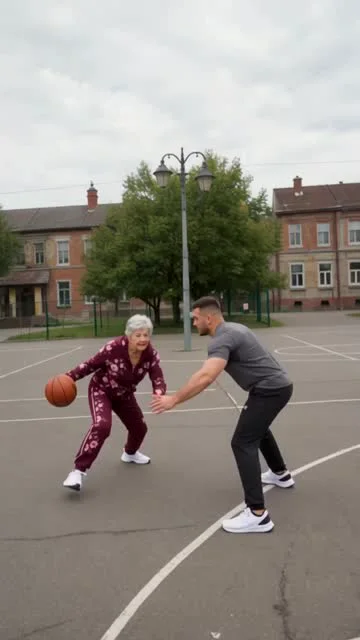
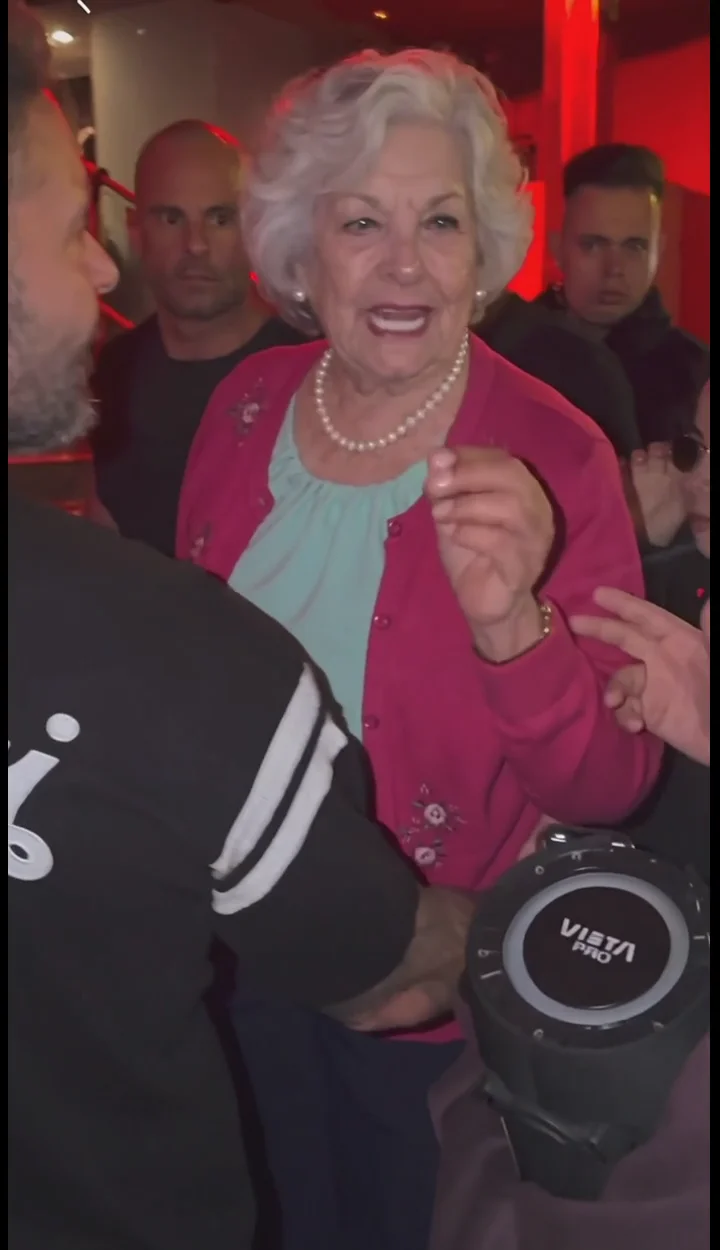
Grandma takes the lead

A fictional adult portrait becomes the foreground performer in this saved 720p Bulin 47 video. Compare the input with the result and check identity, hands and crowd details for yourself.

Fictional adult portrait used for the grandma single-photo Bulin 47 example
Input / reference
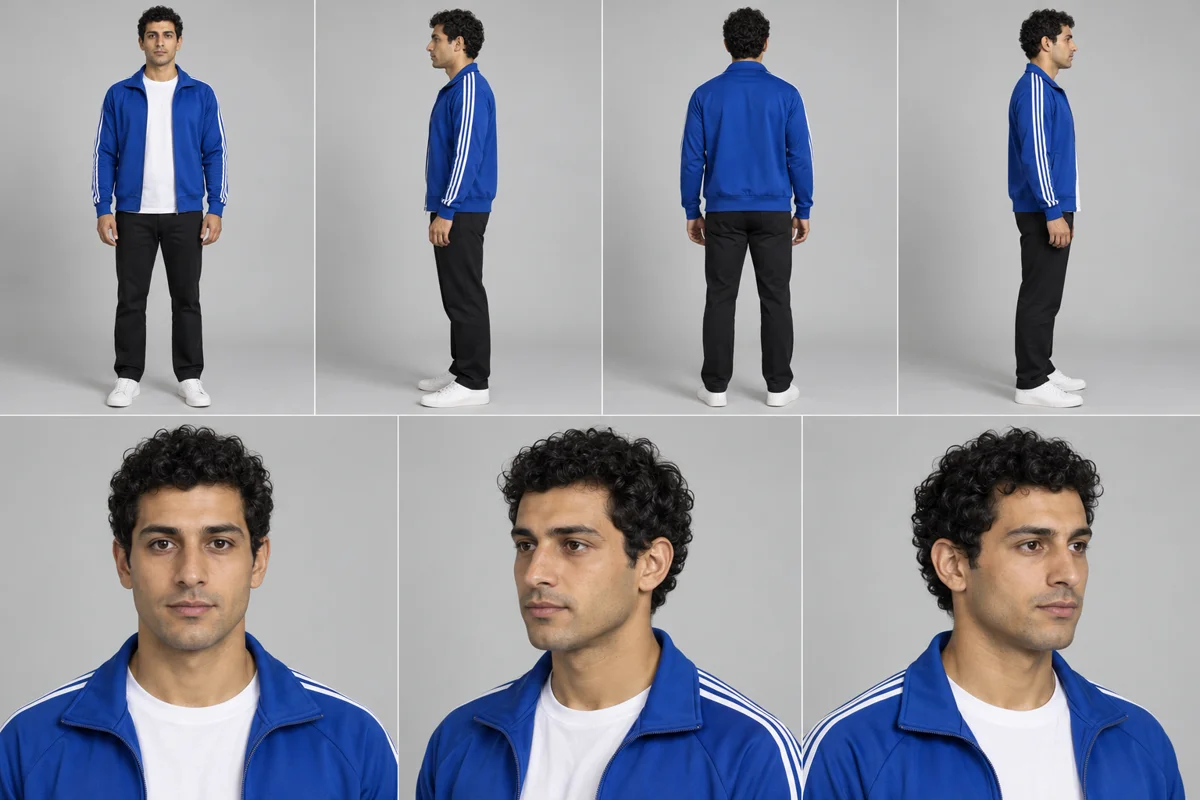
Prepared seven-view reference

A blue-jacket lead joins the crowd

This example used a prepared seven-view character sheet rather than the current single-photo input. It shows another generated Bulin 47 result, not a guaranteed output from the present tool.

Seven-view character reference used for the blue-jacket Bulin 47 example
Input / reference
Example breakdown

What to watch in the 23-second result

These observations describe the grandma example above; they are not promises about every render. Review your own result for identity and visual artifacts before posting.

  1. 0–8 seconds

    The lead faces the crowd

    The recast performer begins the close-range exchange, with the speaker bearer and surrounding crowd establishing the scene.

  2. 8–16 seconds

    Gestures carry the performance

    The lead turns toward different people and uses expressive hand movements as the camera stays with the encounter.

  3. 16–23 seconds

    The exchange continues up close

    The performer remains at the center of the crowd. Check the face, hands, speaker and background details before sharing.

Three steps

How to make your Bulin 47 video

Add one lead photo, choose your quality, then review and download the result in My Creations.

  1. Choose your photo

    Upload one JPG, PNG, WebP, HEIC or HEIF image up to 10 MB. Your photo provides the foreground performer; the prepared crowd is already part of the effect, so you do not need crowd footage or a second photo.

  2. Check the effect & quality

    Confirm that Bulin 47 is selected, then choose Standard 480p for 10 credits or HD 720p for 20 credits. Sign in with an account that has paid credits and check the total before submitting.

  3. Download & post

    When processing is complete, open My Creations to preview the AI result. Check who appears in the clip, download the 23-second MP4, and post it without presenting it as footage of a real appearance. Processing time is not guaranteed.

From references to a generated scene

How it is made

This effect uses your portrait to prepare an identity reference, then generates a new interpretation of a prepared street-performance excerpt. It does not paste a face onto the original video.

Your photo controls

One authorized adult portrait supplies the lead performer's visible facial features, hair, build and clothing. The upload does not choose new people for the crowd or supply a custom background.

The prepared effect controls

MakeHit privately prepares alternate identity views before generating the new scene. The prepared excerpt guides the foreground role, crowd setting, camera and performance timing; its reference soundtrack is assembled with the result. Quality, duration and the exact scene are not open-ended prompt controls.

What to review in the result

Check whether the lead remains recognizable through turns and occlusion, and inspect hands, speaker contact, crowd anatomy, clothing and audio. The generated crowd and details may differ from the reference; no exact identity, lip-sync or scene reproduction is guaranteed.

Pricing & credits

Simple, transparent pricing

Browse examples and choose your photos for free. Generation requires an account and enough credits for your selected quality; compare the current one-time packs and plans below.

View full pricing and credit rules

1 Standard video

$4.99

≈ $4.99 / video · 10 CREDITS · 480P

  • 480p MP4
  • Spend credits on any template; template costs vary.
  • Purchased pack credits have no scheduled expiry while your account and the service remain active
  • Failed renders return credits

1 HD video

$9.99

≈ $9.99 / HD video · 20 CREDITS

  • HD 720p MP4
  • Spend credits on any template; template costs vary.
  • Purchased pack credits have no scheduled expiry while your account and the service remain active
  • Failed renders return credits
Most popular

2 HD videos

$17.99

≈ $9.00 / HD video · 40 CREDITS

  • HD 720p MP4
  • Spend credits on any template; template costs vary.
  • Purchased pack credits have no scheduled expiry while your account and the service remain active
  • Failed renders return credits

3 HD videos

$24.99

≈ $8.33 / HD video · 60 CREDITS

  • HD 720p MP4
  • Spend credits on any template; template costs vary.
  • Purchased pack credits have no scheduled expiry while your account and the service remain active
  • Failed renders return credits

5 HD videos

$39.99

≈ $8.00 / HD video · 100 CREDITS

  • HD 720p MP4
  • Spend credits on any template; template costs vary.
  • Purchased pack credits have no scheduled expiry while your account and the service remain active
  • Failed renders return credits

10 HD videos

$59.99

≈ $6.00 / HD video · 200 CREDITS

  • HD 720p MP4
  • Spend credits on any template; template costs vary.
  • Purchased pack credits have no scheduled expiry while your account and the service remain active
  • Failed renders return credits

One-time payment · Purchased pack credits have no scheduled expiry while your account and the service remain active · No subscription needed

Repeat orders earn bonus credits — applied automatically.

Video format and credit cost
Standard · 480p
480p MP4
10Credits per video on core templates
HD · 720p
HD 720p MP4
20Credits per video on core templates

Failed or blocked jobs return reserved credits automatically. For a serious completed-result issue, request a quality review within 48 hours.

Check photo permissions and the platform’s AI-content rules before publishing. Buying credits does not grant third-party rights. Review the refund policy.

Photo guide

Choose the right lead photo

The lead is the person viewers will follow in the crowd scene, so prioritize a readable face and body over an interesting background. A clear photo gives the effect better visual information, but it cannot guarantee a particular result.

Do

  • One person facing the camera, with the eyes, face, hair and upper body easy to see
  • A sharp, evenly lit waist-up or full-body photo with little motion blur
  • A clear view of the person's outline and clothing, without a cropped head
  • A simple background that separates the lead from other people and objects

Avoid

  • Group photos, side profiles or images where the intended lead is unclear
  • Sunglasses, hands, hair or accessories hiding key facial features
  • Tight face crops, tiny subjects or heavy filters that remove detail
  • Strong blur, harsh shadows or busy backgrounds that obscure the person

Good to know

Before you upload

Use one clear adult photo with visible hair, facial features, upper body and clothing. Get the person's permission; a group image, hidden face or tight crop leaves the intended lead unclear.

Fixed by the template

The foreground role, prepared crowd, street setting, performance excerpt and reference audio come with the effect. You do not upload crowd footage, a second cast image or a soundtrack.

Before you publish

Review the full clip with sound for facial changes, hand and crowd artifacts, continuity and misleading real-event implications. Confirm likeness, performance and music permissions and disclose the AI remake where required.

Creative starting points

Ideas for your Bulin 47 video

Use these as starting points for your own post. They are creative suggestions, not customer results or examples generated by MakeHit.

  1. Take the lead

    Start with an everyday portrait and place yourself at the front of the prepared crowd scene for a playful performance-themed post.

  2. Set up an unexpected-verse reveal

    Pair your clip with a caption about being called up for a verse you never expected to perform. The contrast between an ordinary photo and the crowd setting supplies the joke.

  3. Cast a friend with permission

    With your friend's agreement, use a clear portrait of them for a birthday message or an inside joke. Add the context in your own caption when you share the AI clip.

FAQ

Bulin 47 AI FAQ

If you have more questions about the trend or this template, contact support@makehit.app.

Where did the Bulin 47 AI trend come from?

The trend began with Kevin Wai’s October 1–2, 2026 posts of a Spanish freestyle exchange with Dominican artist Bulin 47 outside a venue in Spain. Kevin played a dembow beat on a portable speaker; Bulin answered with rhymes, shoulder moves and dancing. Reposts and AI versions recasting the lead followed. The original post, HCG, MARCA and LatiNation document this sequence.

What does Bulin 47 do with my photo?

Your lead photo supplies the person placed at the front of the prepared crowd scene. The crowd stays in the setting while your subject takes the lead performance role. The output is a 23-second vertical MP4.

Is this the original Bulin 47 video or an official release?

MakeHit’s result is neither the original street recording nor an official release from Bulin 47 or Kevin Wai; it is a new AI version made from your lead photo. Do not present it as authentic footage of your subject performing at the original event.

How many photos do I need, and what kind works best?

You need one lead photo. Choose a sharp, well-lit image of one person facing the camera, ideally waist-up or full-body with the face, hair and clothing easy to see. Avoid group photos, tight face crops, side profiles, blur, obstructions and heavy filters. JPG, PNG, WebP, HEIC and HEIF files up to 10 MB are supported. These tips can help, but a specific result is not guaranteed.

Can I use a group photo or replace the crowd?

The template requires one lead photo, and that image supplies the foreground performer rather than separate people for the crowd. A group photo makes the intended subject less clear, so upload one person. The prepared crowd remains part of the template.

What quality options are available, and how much do they cost?

Standard 480p costs 10 credits. HD 720p costs 20 credits. Confirm your selected quality and its cost before submitting the generation.

Can I use Bulin 47 AI for free without an account?

You can browse the template and watch its example for free, but generating a video requires an account and paid credits. Processing time is not guaranteed, so the page does not promise an exact completion time.

Where can I preview or download the finished video?

Open My Creations after processing is complete to preview your result or download the MP4. Review the AI-generated clip before sharing it so you do not present it as real event footage.

Can I upload a photo of a friend or someone else?

Only upload a photo when you have the necessary rights and permission to use it. If another person is shown, get their agreement before uploading or sharing an AI-generated version. Do not imply that they actually took part in the original freestyle.

What happens if my generation fails or is blocked?

Failed or blocked generations automatically return the reserved credits.

Bulin 47 AI

Join Kevin Wai’s street freestyle with Bulin 47 AI

Take the lead beside Kevin’s speaker and the watching crowd. Choose one photo, confirm your quality, and create a 23-second MP4 with an account and paid credits.

From $4.99 · Creator $5.00/HD · No scheduled credit expiry